
OEM Chevy DVD Displays

DVD Unit

DVD Unit


DVD Unit

DVD Unit
DVD Unit

No results found for "dvd". Here are some helpful search tips:
- Search by a part name. Example: water pump.
- Be less specific. Example: brake instead of ceramic brake.
- Remove information such as make, year or model.
- Can't find the part you are looking for? Contact us and we'll find it for you!
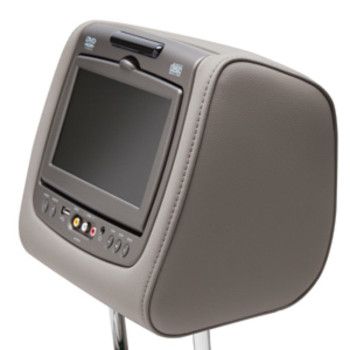
The Truth About Making Chevrolet DVD Units Last
The interior entertainment system of your family vehicle is responsible for maintaining cabin tranquility during long-distance travel. A high-quality genuine dvd system is the most critical factor in preserving passenger comfort and luxury. For owners of the spacious Chevrolet Suburban, a reliable rear-seat entertainment system allows children and guests to enjoy high-definition media without distracting the driver.
How to Keep Your Chevrolet DVD Unit in Mint Condition
1. Perform a Clinical Lens Cleaning
Use a specialized genuine laser cleaning disc to remove microscopic dust that causes skipping or slow media loading times.
2. Replace Remote Batteries
Check the genuine wireless remote annually; leaking alkaline batteries can permanently damage the internal circuits.
3. Sync Wireless Headphones
Use the dashboard infotainment menu to pair your genuine headphones to the correct IR channel for a static-free audio experience.
4. Inspect Ribbon Cable Integrity
Gently tilt the headrest to check the protective wiring sleeve for any signs of fraying or pinching that could cause a loss of signal.
5. Update System Firmware
Check for the latest software updates to ensure your entertainment hub supports the latest digital media and file formats.
6. Verify HDMI Connection
Plug in a known working device to test the data port; ensure the pins are clinical and free of debris for a reliable video link.
Upgrade Passenger Entertainment at Gordon Auto Parts Nationwide
To find the exact infotainment system parts for your Chevrolet model, contact us and our specialists will assist you today.